
How to Calculate Weekly Working Hours From a Work Schedule
Learn how to calculate weekly work hours from your schedule with simple formulas, examples, break deductions, and tips for different shifts.
Calcifyai Team
Expert calculators & financial tools
Knowing how many hours you work each week helps you manage your time, review your timesheet, estimate your pay, and understand your work schedule. Whether you work five regular days, part-time shifts, or different hours each day, calculating your weekly working hours is straightforward.
To calculate weekly work hours, find the working time for each day after subtracting applicable unpaid breaks, then add the daily totals together.
For example, if you work 8 hours on Monday, 7.5 hours on Tuesday, and 8 hours on each of the remaining three weekdays, your weekly total is 39.5 hours.
This guide explains how to calculate weekly working hours step by step, including schedules with different shifts, unpaid breaks, overnight work, and minutes. You will also learn how to convert your total into decimal hours and estimate weekly work time from a regular schedule.
How to Calculate Weekly Work Hours
The basic formula is:
Weekly Work Hours = Sum of Daily Working Hours
If your schedule is the same every day, you can use a shorter formula:
Weekly Work Hours = Daily Net Hours × Working Days
Daily net hours are the time you actually work after subtracting applicable unpaid breaks.
Quick Example
Suppose you work from 9:00 AM to 5:30 PM, with a 30-minute unpaid lunch break, five days a week.
Start time: 9:00 AM
End time: 5:30 PM
Total shift duration: 8 hours 30 minutes
Unpaid break: 30 minutes
Net daily work time: 8 hours
Calculate the weekly total:
8 × 5 = 40 hours
Your weekly working hours are 40 hours.
Step-by-Step Method to Calculate Weekly Working Hours
Follow these steps to calculate your weekly hours from a work schedule.
Step 1: Write Down Your Work Schedule
Start by listing your working days and the start and end times for each shift.
For example:
Day | Start Time | End Time | Unpaid Break |
|---|---|---|---|
Monday | 9:00 AM | 5:30 PM | 30 minutes |
Tuesday | 9:00 AM | 5:00 PM | 30 minutes |
Wednesday | 10:00 AM | 6:00 PM | 1 hour |
Thursday | 9:00 AM | 5:30 PM | 30 minutes |
Friday | 8:30 AM | 4:30 PM | 30 minutes |
Writing down your complete schedule makes it easier to spot different shift lengths and break periods.
Step 2: Calculate Each Day's Shift Duration
Subtract the start time from the end time to find the total shift duration.
For example, if you work from 9:00 AM to 5:30 PM:
5:30 PM − 9:00 AM = 8 hours 30 minutes
This is your gross shift duration before deducting breaks.
Step 3: Subtract Unpaid Breaks
Subtract applicable unpaid breaks from each shift.
For Monday:
Gross shift: 8 hours 30 minutes
Unpaid break: 30 minutes
Net working time: 8 hours
Repeat this calculation for each working day.
Step 4: Add Your Daily Working Hours
Once you have calculated each day's net working time, add the totals.
Using the example schedule:
Day | Net Working Hours |
|---|---|
Monday | 8 hours |
Tuesday | 7.5 hours |
Wednesday | 7 hours |
Thursday | 8 hours |
Friday | 7.5 hours |
Total | 38 hours |
The calculation is:
8 + 7.5 + 7 + 8 + 7.5 = 38 hours
Your total weekly working time is 38 hours.
Step 5: Convert the Result if Needed
Some timesheets display working time in hours and minutes, while others use decimal hours.
To convert minutes into decimal hours, use:
Decimal Hours = Hours + (Minutes ÷ 60)
For example, 38 hours and 45 minutes becomes:
38 + (45 ÷ 60) = 38.75 hours
This format is useful for comparing weekly totals and preparing time records.
Examples of Calculating Weekly Work Hours
Different work schedules require slightly different calculations. Here are some common examples.
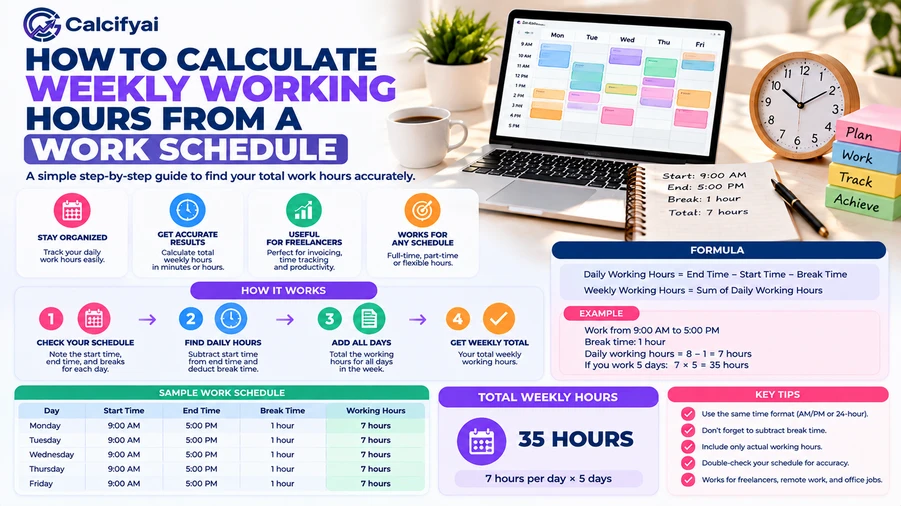
Example 1: Regular 9-to-5 Schedule
Suppose you work from 9:00 AM to 5:00 PM, Monday through Friday, with a one-hour unpaid lunch break each day.
Gross daily shift:
5:00 PM − 9:00 AM = 8 hours
Net daily work time:
8 − 1 = 7 hours
Weekly work hours:
7 × 5 = 35 hours
Your weekly working time is 35 hours.
Example 2: Different Working Hours Each Day
Suppose your schedule changes throughout the week:
Monday: 8 hours
Tuesday: 6.5 hours
Wednesday: 9 hours
Thursday: 7.5 hours
Friday: 8 hours
Add the daily totals:
8 + 6.5 + 9 + 7.5 + 8 = 39 hours
Your weekly total is 39 hours.
When daily hours vary, adding each day's net working time is more accurate than multiplying one day's hours by five.
Example 3: Part-Time Work Schedule
Imagine you work four days a week, with a six-hour shift each day and no unpaid breaks.
Weekly work hours:
6 × 4 = 24 hours
Your weekly working time is 24 hours.
This same method works for part-time jobs, temporary schedules, and other arrangements with consistent daily hours.
Example 4: Weekly Schedule With Different Shifts and Breaks
Suppose your work schedule is:
Day | Shift | Unpaid Break | Net Hours |
|---|---|---|---|
Monday | 8 AM–4 PM | 30 min | 7.5 |
Tuesday | 10 AM–6 PM | 1 hour | 7 |
Wednesday | 9 AM–5 PM | 30 min | 7.5 |
Thursday | 12 PM–8 PM | 30 min | 7.5 |
Friday | 8 AM–5 PM | 1 hour | 8 |
Total | 37.5 |
Add the net hours:
7.5 + 7 + 7.5 + 7.5 + 8 = 37.5 hours
Your weekly working time is 37 hours and 30 minutes, or 37.5 decimal hours.
How to Calculate Weekly Hours for Different Work Schedules
Not every employee follows a regular Monday-to-Friday schedule. You may work weekends, split shifts, overnight shifts, or different hours from week to week.
Calculating Hours for a Weekend Work Schedule
If you work on Saturday and Sunday, include those hours in your weekly total.
For example:
Day | Net Hours |
|---|---|
Monday | 0 |
Tuesday | 0 |
Wednesday | 0 |
Thursday | 8 |
Friday | 8 |
Saturday | 6 |
Sunday | 5 |
Total | 27 hours |
Add all working days, including weekends:
8 + 8 + 6 + 5 = 27 hours
Your weekly working time is 27 hours.
Calculating Hours for Split Shifts
A split shift includes two or more separate working periods in one day.
For example, you work from 8:00 AM to 12:00 PM and return from 4:00 PM to 8:00 PM.
First shift: 4 hours
Second shift: 4 hours
Daily total: 4 + 4 = 8 hours
If you follow this schedule for five days:
8 × 5 = 40 hours
For more examples involving multiple shifts, breaks, and overnight work, see the guide on calculating hours worked across multiple shifts.
Calculating Overnight Shifts
An overnight shift starts on one day and ends the following morning.
For example, suppose you work from 10:00 PM to 6:00 AM.
10:00 PM to midnight = 2 hours
Midnight to 6:00 AM = 6 hours
Total shift duration = 8 hours
If you take a 30-minute unpaid break, your net working time is 7.5 hours.
For a weekly total, add this shift's net hours to the other days in your workweek. Be careful not to count the same overnight shift twice when recording the schedule by calendar date.
How to Calculate Weekly Working Hours With a Calculator
If you have a regular schedule, an online work hours calculator can help estimate your weekly total without adding every shift manually.
You can use the CalcifyAI Work Hours Calculator to calculate shift duration, account for unpaid breaks, and estimate weekly hours.
Here is how to use it:
Enter your start time. Choose the time your shift begins.
Enter your end time. Select the time your shift finishes.
Add your unpaid break. Enter the applicable break duration in hours or minutes.
Enter working days per week. Choose how many days you normally work.
Add your hourly rate if needed. This is optional if you only want to calculate hours.
Calculate your results. Review the daily and estimated weekly totals.
The calculator is designed around a repeated daily schedule. If your shifts vary significantly from day to day, calculate each day's net hours separately and add them together.
How Breaks Affect Weekly Working Hours
Breaks can change the total number of hours recorded for a workweek. The key difference is between the total time spent at work and the time counted as working hours.
For example, suppose you are at work from 8:00 AM to 4:30 PM and take a 30-minute unpaid meal break.
Total time at work: 8.5 hours
Unpaid break: 0.5 hours
Net working time: 8 hours
Over five days:
8 × 5 = 40 working hours
Break rules depend on your location and workplace circumstances. In the United States, the Department of Labor explains that short rest breaks offered by employers are generally counted as paid work time under federal law, while bona fide meal periods are generally not counted as work time when the employee is relieved of duties. Read the U.S. Department of Labor's break and meal period guidance for details.
Common Mistakes When Calculating Weekly Work Hours
Small errors can make your weekly total inaccurate. Watch out for these common problems.
Forgetting to Subtract Unpaid Breaks
If you subtract unpaid breaks from some days but forget them on others, your total will be too high. Review every shift before adding your weekly hours.
Adding Hours and Minutes Incorrectly
Minutes are based on 60, not 100.
For example:
7 hours 30 minutes = 7.5 hours
8 hours 45 minutes = 8.75 hours
Do not write 7 hours 30 minutes as 7.30 decimal hours.
Using the Same Daily Hours for Every Day
Multiplying daily hours by the number of working days only works when your net daily schedule is consistent. If your shifts vary, calculate each day separately.
Mixing Up Gross Shift Time and Net Work Time
Gross shift time is the period between starting and finishing work. Net work time is the amount counted after applicable unpaid breaks are deducted.
Make sure you use the right figure for your purpose.
Counting Overnight Shifts Twice
An overnight shift may cross midnight, but it is still one continuous shift. Record the full duration once and assign it to the appropriate workweek according to your workplace's timekeeping system.
Assuming Every Week Uses the Same Overtime Rules
A weekly total is a time calculation, not a complete legal overtime determination. Overtime rules can depend on location, job classification, and the applicable workweek.
Frequently Asked Questions
How do I calculate weekly work hours from a schedule?
Calculate the net working time for each day by subtracting applicable unpaid breaks from the shift duration. Then add the daily totals to get your weekly working hours.
How many hours are in a 5-day workweek?
It depends on your daily schedule. If you work 8 hours per day for five days, your weekly total is 40 hours. If you work 7.5 hours per day, your total is 37.5 hours.
How do I calculate weekly hours if I work different hours each day?
Calculate the net hours for every shift separately. Add the results for all days in your workweek. This method works for schedules with varying start times, shift lengths, and breaks.
How do I calculate weekly work hours in decimal format?
Convert minutes into a fraction of an hour by dividing them by 60. Then add that amount to your whole hours.
For example:
36 hours and 45 minutes = 36 + (45 ÷ 60) = 36.75 hours.
Do unpaid breaks count toward weekly working hours?
Unpaid breaks are generally excluded from net working hours, but break rules vary by jurisdiction and circumstances. Check the applicable workplace policy and labor rules before making payroll or overtime calculations.
How do I calculate weekly hours for a part-time job?
Calculate the net hours for each shift and add them together. For a consistent schedule, multiply your net daily hours by the number of days you work each week.
How do I calculate overtime from weekly work hours?
First, calculate your total working hours for the applicable workweek. Then compare that total with the overtime threshold that applies to your situation. For example, a simple calculation using a 40-hour threshold would show 5 hours above the threshold for a 45-hour week. Actual overtime eligibility and pay rules depend on applicable law and employment circumstances.
Conclusion
Calculating weekly working hours is easier when you break your schedule into daily shifts. Find the duration of each shift, subtract applicable unpaid breaks, and add the net hours together. If you work the same hours every day, you can multiply your daily net hours by the number of working days.
For schedules with changing shifts, weekends, or overnight work, calculate each shift separately to avoid errors. Keeping a clear record of your working time also makes it easier to check timesheets, estimate pay, and plan your week.
Disclaimer
The information provided in this article is for educational and informational purposes only. It should not be considered as professional financial, medical, or legal advice. Always consult with qualified professionals for specific guidance related to your situation.
Popular Calculators
Explore our most-used free calculators for finance, health, and everyday needs.