
How to Add Up Hours and Minutes for a Timesheet
Learn how to add up work hours and minutes for a timesheet, calculate weekly totals, handle breaks, and convert time to decimal hours.
Calcifyai Team
Expert calculators & financial tools
Adding up work hours on a timesheet looks simple until you have several shifts with different minutes. For example, you might have 7 hours 45 minutes on one day, 8 hours 30 minutes on another, and 6 hours 50 minutes on a third day.
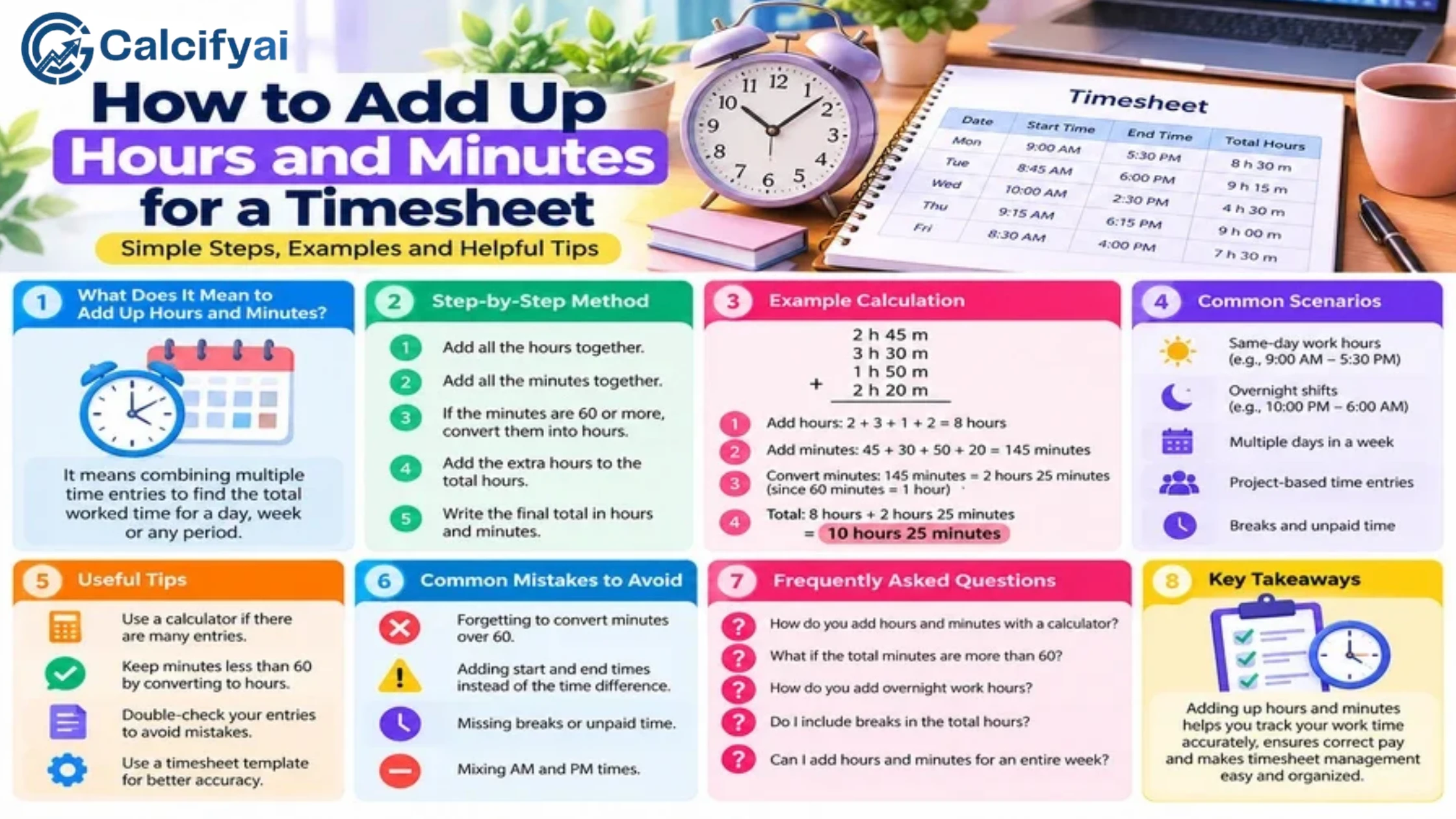
The good news is that adding work hours becomes easy when you keep hours and minutes separate, convert every 60 minutes into 1 hour, and check your final total.
This guide explains how to add up work hours for a timesheet, handle extra minutes, calculate weekly totals, convert the result to decimal hours, and avoid common timesheet mistakes.
How Do You Add Up Work Hours?
The easiest method is:
Add all the hours.
Add all the minutes.
Convert every 60 minutes into 1 hour.
Add that extra hour to the hours total.
Convert the final result to decimal hours if needed.
The basic formula is:
Total Work Time = Total Hours + Total Minutes
Then:
60 minutes = 1 hour
For example:
6 hours 30 minutes
7 hours 45 minutes
8 hours 20 minutes
Add the hours:
6 + 7 + 8 = 21 hours
Add the minutes:
30 + 45 + 20 = 95 minutes
Convert 95 minutes:
95 minutes = 1 hour 35 minutes
Now add:
21 hours + 1 hour 35 minutes = 22 hours 35 minutes
So the total is 22 hours 35 minutes.
Step-by-Step Method for Adding Timesheet Hours
Step 1: Write Down Each Time Entry
Start with the hours and minutes worked for each day.
For example:
Day | Hours Worked |
|---|---|
Monday | 7 hours 30 minutes |
Tuesday | 8 hours 15 minutes |
Wednesday | 6 hours 45 minutes |
Thursday | 8 hours 30 minutes |
Friday | 7 hours 20 minutes |
Before adding anything, make sure each entry represents actual work time, after applicable unpaid breaks have been deducted.
Step 2: Add the Hours
Add only the whole hours first:
7 + 8 + 6 + 8 + 7 = 36 hours
Step 3: Add the Minutes
Now add the minutes:
30 + 15 + 45 + 30 + 20 = 140 minutes
Step 4: Convert Minutes Into Hours
Because 60 minutes equals 1 hour:
140 minutes = 2 hours 20 minutes
Step 5: Add the Extra Hours
Add the 2 hours to the original 36 hours:
36 + 2 = 38 hours
The final result is:
38 hours 20 minutes
Answer
The employee worked 38 hours and 20 minutes for the week.
Example: Add Three Work Shifts
Suppose your timesheet contains these entries:
Shift 1: 4 hours 45 minutes
Shift 2: 5 hours 30 minutes
Shift 3: 2 hours 15 minutes
Add the hours
4 + 5 + 2 = 11 hours
Add the minutes
45 + 30 + 15 = 90 minutes
Convert 90 minutes:
90 minutes = 1 hour 30 minutes
Now add:
11 hours + 1 hour 30 minutes = 12 hours 30 minutes
Answer
12 hours 30 minutes
This same method works when adding daily shifts, split shifts, or several entries on one timesheet.
How to Add Hours and Minutes When Minutes Exceed 60
This is one of the most important parts of adding timesheet hours.
Suppose you have:
7 hours 40 minutes
8 hours 35 minutes
6 hours 50 minutes
Add the hours
7 + 8 + 6 = 21 hours
Add the minutes
40 + 35 + 50 = 125 minutes
Now convert 125 minutes:
125 minutes = 2 hours 5 minutes
Add the extra 2 hours:
21 + 2 = 23 hours
Final total
23 hours 5 minutes
Whenever your minutes reach 60 or more, convert the excess minutes into hours.
How to Add Work Hours With Breaks
Breaks can affect your timesheet total.
Suppose you work from 9:00 AM to 5:30 PM and take a 30-minute unpaid break.
First calculate the total shift:
9:00 AM to 5:30 PM = 8 hours 30 minutes
Subtract the unpaid break:
8 hours 30 minutes − 30 minutes = 8 hours
Your recorded work time is therefore:
8 hours
A work-hours calculator can simplify this process by calculating the shift and accounting for break time. The Work Hours Calculator can calculate daily and weekly work hours while accounting for breaks.
How to Add Multiple Shifts in One Day
Some employees have more than one working period during the same day.
For example:
Morning: 7:30 AM–11:45 AM
Afternoon: 1:00 PM–5:30 PM
Evening: 7:00 PM–9:15 PM
Calculate each shift separately.
Morning shift
7:30 AM to 11:45 AM:
4 hours 15 minutes
Afternoon shift
1:00 PM to 5:30 PM:
4 hours 30 minutes
Evening shift
7:00 PM to 9:15 PM:
2 hours 15 minutes
Now add the hours:
4 + 4 + 2 = 10 hours
Add the minutes:
15 + 30 + 15 = 60 minutes
Since 60 minutes equals 1 hour:
10 hours + 1 hour = 11 hours
Answer
The total work time is 11 hours.
For more complicated schedules involving multiple shifts or overnight work, see this guide on calculating hours worked across multiple shifts.
How to Add Weekly Work Hours
To calculate weekly work hours, first calculate each day's work time.
For example:
Day | Work Time |
|---|---|
Monday | 7 hours 30 minutes |
Tuesday | 8 hours |
Wednesday | 7 hours 45 minutes |
Thursday | 8 hours 15 minutes |
Friday | 8 hours |
Add the hours
7 + 8 + 7 + 8 + 8 = 38 hours
Add the minutes
30 + 0 + 45 + 15 + 0 = 90 minutes
Convert:
90 minutes = 1 hour 30 minutes
Therefore:
38 hours + 1 hour 30 minutes = 39 hours 30 minutes
Weekly total
39 hours 30 minutes
How to Convert Hours and Minutes to Decimal Hours
Timesheets and payroll systems may ask for work time in decimal hours instead of hours and minutes.
The formula is:
Decimal Hours = Hours + (Minutes ÷ 60)
For example, suppose you worked:
7 hours 30 minutes
Convert the minutes:
30 ÷ 60 = 0.50
Then:
7 + 0.50 = 7.50 hours
So:
7 hours 30 minutes = 7.50 decimal hours
Common Time Conversions
Hours and Minutes | Decimal Hours |
|---|---|
7 hours | 7.00 |
7 hours 15 minutes | 7.25 |
7 hours 30 minutes | 7.50 |
7 hours 45 minutes | 7.75 |
8 hours | 8.00 |
8 hours 15 minutes | 8.25 |
8 hours 30 minutes | 8.50 |
8 hours 45 minutes | 8.75 |
Important
Do not treat minutes as if they were decimal digits.
For example:
7 hours 30 minutes ≠ 7.30 hours
The correct decimal value is:
7.50 hours
because 30 minutes is half of an hour.
How to Add Decimal Work Hours
If your timesheet already uses decimal hours, you can add the values directly.
For example:
Monday: 7.50
Tuesday: 8.00
Wednesday: 7.75
Thursday: 8.25
Friday: 8.00
Add them:
7.50 + 8.00 + 7.75 + 8.25 + 8.00 = 39.50 hours
The weekly total is:
39.50 hours
This is equivalent to:
39 hours 30 minutes
Hours and Minutes vs. Decimal Hours
These two formats represent time differently.
Hours and minutes
8 hours 30 minutes
This is the normal clock-time format.
Decimal hours
8.50 hours
This format represents a fraction of an hour.
Remember:
15 minutes = 0.25 hours
30 minutes = 0.50 hours
45 minutes = 0.75 hours
60 minutes = 1.00 hour
Understanding this difference prevents many payroll and timesheet errors.
How to Add Overnight Work Hours
An overnight shift crosses midnight, so you should calculate the work period carefully.
For example:
10:00 PM to 6:00 AM
Break it into two parts.
Before midnight
10:00 PM to 12:00 AM:
2 hours
After midnight
12:00 AM to 6:00 AM:
6 hours
Add them:
2 + 6 = 8 hours
So the overnight shift is:
8 hours
If an unpaid 30-minute break applies:
8 hours − 30 minutes = 7 hours 30 minutes
The final work time is:
7 hours 30 minutes
How to Add Work Hours for Payroll
When preparing a timesheet for payroll, calculate each work period carefully and distinguish between working time and breaks.
For example:
Day | Gross Time | Unpaid Break | Work Time |
|---|---|---|---|
Monday | 8h 30m | 30m | 8h |
Tuesday | 9h | 30m | 8h 30m |
Wednesday | 8h | 0m | 8h |
Thursday | 9h 15m | 30m | 8h 45m |
Friday | 8h 30m | 30m | 8h |
Now add the work time:
8:00 + 8:30 + 8:00 + 8:45 + 8:00
Add hours:
8 + 8 + 8 + 8 + 8 = 40 hours
Add minutes:
0 + 30 + 0 + 45 + 0 = 75 minutes
Convert 75 minutes:
75 minutes = 1 hour 15 minutes
Therefore, the total is:
41 hours 15 minutes
For US employees covered by the FLSA, employers have recordkeeping obligations that include recording hours worked each day and total hours worked each workweek. See the U.S. Department of Labor's recordkeeping guidance for the federal requirements. U.S. Department of Labor
Common Mistakes When Adding Work Hours
1. Forgetting That 60 Minutes Equals One Hour
If your total is 85 minutes, don't leave it as 85 minutes.
Convert it:
85 minutes = 1 hour 25 minutes
2. Treating Minutes as Decimal Numbers
This is one of the most common mistakes.
30 minutes is not 0.30 hours.
The correct conversion is:
30 ÷ 60 = 0.50 hours
3. Adding Clock Times Instead of Work Durations
A timesheet might show:
8:00 AM–12:00 PM
and
1:00 PM–5:00 PM
Do not simply calculate from 8 AM to 5 PM.
The employee was not working from noon to 1 PM.
Calculate each work period separately:
4 hours + 4 hours = 8 hours
4. Forgetting Unpaid Breaks
If a break should be excluded from work time, subtract it before adding the daily or weekly totals.
5. Rounding Too Early
Keep the original hours and minutes while doing the calculation.
For example, keep:
7 hours 35 minutes
rather than immediately converting and rounding it.
Convert to decimal hours at the end if your timesheet requires it.
6. Forgetting Overnight Shifts
A shift from 10 PM to 6 AM does not have a negative duration.
Split it at midnight:
10 PM–12 AM = 2 hours
12 AM–6 AM = 6 hours
Total:
8 hours
A Quick Timesheet Calculation Formula
For multiple work periods, you can think of the calculation as:
Total Work Time = Shift 1 + Shift 2 + Shift 3 + ... − Applicable Unpaid Breaks
When working with hours and minutes:
Total Hours = Sum of all hours + Extra hours from total minutes
Total Minutes = Sum of all minutes
Then convert every 60 minutes into 1 hour.
Quick Example to Remember
Suppose your timesheet has:
5 hours 20 minutes
6 hours 45 minutes
7 hours 30 minutes
Add hours
5 + 6 + 7 = 18 hours
Add minutes
20 + 45 + 30 = 95 minutes
Convert minutes
95 minutes = 1 hour 35 minutes
Add the extra hour
18 + 1 = 19 hours
Final answer
19 hours 35 minutes
That's the basic process you can use for almost any timesheet.
Frequently Asked Questions
How do I add up work hours on a timesheet?
Add all the whole hours first, then add all the minutes. Convert every 60 minutes into 1 hour and add that extra hour to your total.
How do I add hours and minutes together?
Keep hours and minutes separate. For example:
4h 30m + 5h 45m
Hours:
4 + 5 = 9
Minutes:
30 + 45 = 75 = 1h 15m
Final:
10h 15m
How do I calculate total weekly hours?
Calculate the actual work time for each day, subtract applicable unpaid breaks, and then add the daily totals.
How many decimal hours is 30 minutes?
30 minutes is 0.50 decimal hours.
30 ÷ 60 = 0.50
How many decimal hours is 45 minutes?
45 minutes is 0.75 decimal hours.
45 ÷ 60 = 0.75
Is 7 hours and 30 minutes equal to 7.30 hours?
No. In decimal-hour format, 7 hours 30 minutes is 7.50 hours.
How do I add hours when the total minutes are more than 60?
Divide the total minutes by 60. The whole-number result is added to the hours, while the remainder stays as minutes.
For example:
125 minutes = 2 hours 5 minutes
Should I subtract lunch breaks from my timesheet?
If the break is unpaid and should not count as working time, subtract it from the shift total. Whether a break is paid or unpaid depends on the applicable workplace rules and circumstances.
Final Takeaway
Adding up hours and minutes for a timesheet is straightforward once you use a consistent method.
Remember:
1. Add the hours.
2. Add the minutes.
3. Convert every 60 minutes into 1 hour.
4. Add the extra hours.
5. Convert to decimal hours only when needed.
For example:
21 hours + 95 minutes
becomes:
22 hours 35 minutes
The biggest thing to remember is that 60 minutes equals 1 hour, not 100 minutes. Keeping hours and minutes separate until the end makes timesheet calculations much easier and helps prevent payroll errors.
Disclaimer
The information provided in this article is for educational and informational purposes only. It should not be considered as professional financial, medical, or legal advice. Always consult with qualified professionals for specific guidance related to your situation.
Popular Calculators
Explore our most-used free calculators for finance, health, and everyday needs.