
Aspect Ratio Guide for Images and Videos (Complete Beginner's Guide)
Learn everything about aspect ratios for images and videos. Discover common aspect ratios, calculations, examples, social media dimensions, and best practices.
Calcifyai Team
Expert calculators & financial tools
Aspect ratio is one of the most important concepts in photography, graphic design, filmmaking, web design, and social media content creation. Whether you're uploading a YouTube video, creating Instagram posts, designing a website banner, or editing photos, understanding aspect ratios helps ensure your content looks professional and displays correctly.
An incorrect aspect ratio can stretch, crop, distort, or reduce the quality of your content.
In this guide, you'll learn what aspect ratios are, how to calculate them, common image and video aspect ratios, and how they're used across different platforms.
If you need to calculate or simplify aspect ratios quickly, you can use our ratio calculator to determine image and video ratios instantly.
What Is an Aspect Ratio?
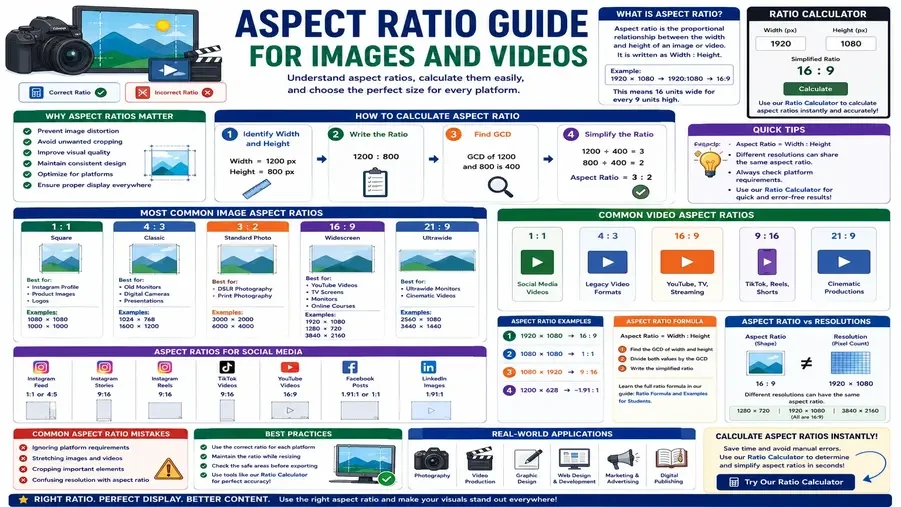
An aspect ratio is the proportional relationship between the width and height of an image, video, screen, or design.
It is written as:
Width : Height
Example
1920 × 1080
Aspect Ratio:
1920:1080
Simplified:
16:9
This means the content is 16 units wide for every 9 units high.
If you're unfamiliar with ratio simplification, see our guide on Simplifying Ratios Explained with Examples.
Why Aspect Ratios Matter
Using the correct aspect ratio helps:
Prevent image distortion
Avoid unwanted cropping
Improve visual quality
Maintain consistent design layouts
Optimize social media content
Ensure proper display across devices
A properly sized image or video creates a better user experience.
How to Calculate Aspect Ratio
Step 1: Identify Width and Height
Example:
Width = 1200 pixels
Height = 800 pixels
Step 2: Write the Ratio
1200:800
Step 3: Find the Greatest Common Divisor
GCD:
400
Step 4: Simplify
1200 ÷ 400 = 3
800 ÷ 400 = 2
Aspect Ratio:
3:2
You can use our ratio calculator to calculate aspect ratios automatically and avoid manual calculations.
Most Common Image Aspect Ratios
1:1 (Square)
Examples:
Instagram profile pictures
Product images
Logos
Dimensions:
1080 × 1080
1000 × 1000
4:3
Commonly used for:
Older computer monitors
Digital cameras
Presentation slides
Examples:
1024 × 768
1600 × 1200
3:2
Popular for:
DSLR photography
Print photography
Examples:
3000 × 2000
6000 × 4000
16:9
Most widely used aspect ratio today.
Used for:
YouTube videos
TV screens
Computer monitors
Online courses
Examples:
1920 × 1080
1280 × 720
3840 × 2160
21:9
Used for:
Ultrawide monitors
Cinematic video production
Examples:
2560 × 1080
3440 × 1440
Common Video Aspect Ratios
Aspect Ratio | Typical Use |
1:1 | Social media videos |
4:3 | Legacy video formats |
16:9 | YouTube, TV, streaming |
9:16 | TikTok, Reels, Shorts |
21:9 | Cinematic productions |
Aspect Ratios for Social Media
Instagram Feed
Recommended:
1:1
or
4:5
Instagram Stories
Aspect Ratio:
9:16
Instagram Reels
Aspect Ratio:
9:16
TikTok Videos
Aspect Ratio:
9:16
YouTube Videos
Aspect Ratio:
16:9
Facebook Posts
Aspect Ratio:
1.91:1
or
1:1
LinkedIn Images
Aspect Ratio:
1.91:1
Aspect Ratio Examples
Example 1
Dimensions:
1920 × 1080
Ratio:
16:9
Example 2
Dimensions:
1080 × 1080
Ratio:
1:1
Example 3
Dimensions:
1080 × 1920
Ratio:
9:16
Example 4
Dimensions:
1200 × 628
Ratio:
Approximately 1.91:1
Aspect Ratio Formula
The formula is:
Aspect Ratio = Width : Height
To simplify:
Find the greatest common divisor.
Divide both values.
Write the simplified ratio.
Students learning ratio calculations may also find our article on Ratio Formula and Examples for Students helpful.
Aspect Ratio vs Resolution
Many people confuse these concepts.
Aspect Ratio
Describes shape.
Example:
16:9
Resolution
Describes pixel count.
Example:
1920 × 1080
Different resolutions can share the same aspect ratio.
Examples:
1280 × 720
1920 × 1080
3840 × 2160
All have a 16:9 aspect ratio.
Common Aspect Ratio Mistakes
Ignoring Platform Requirements
Different platforms require different aspect ratios.
Stretching Images
Changing dimensions without preserving the ratio can distort content.
Cropping Important Elements
Improper resizing can remove critical parts of an image.
Confusing Resolution and Aspect Ratio
Always remember that resolution and aspect ratio are different measurements.
To avoid calculation mistakes, review our guide on Common Ratio Mistakes and How to Avoid Them.
Best Practices for Choosing Aspect Ratios
For YouTube
Use:
16:9
For Instagram Feed
Use:
1:1 or 4:5
For Reels and Shorts
Use:
9:16
For Photography
Use:
3:2
For Websites
Use:
16:9 or 21:9
depending on layout requirements.
Real-World Applications of Aspect Ratios
Aspect ratios are used in:
Photography
Video production
Graphic design
UI/UX design
Website development
Social media marketing
Advertising
Digital publishing
Understanding ratios helps creators produce professional-looking content.
Frequently Asked Questions
What is the most common aspect ratio?
16:9 is the most widely used aspect ratio for modern videos and displays.
What aspect ratio does YouTube use?
YouTube primarily uses 16:9.
What aspect ratio is best for Instagram Reels?
9:16.
How do I calculate aspect ratio?
Divide width and height by their greatest common divisor.
Can I calculate aspect ratios automatically?
Yes. You can use our ratio calculator to calculate and simplify aspect ratios instantly.
Conclusion
Aspect ratios play a critical role in creating images, videos, and digital content that display correctly across different devices and platforms. Understanding how aspect ratios work helps prevent distortion, cropping issues, and poor visual presentation.
Whether you're designing graphics, editing videos, or creating social media content, mastering aspect ratios can significantly improve content quality and user experience.
For quick calculations, use our ratio calculator to determine image and video aspect ratios instantly and simplify dimensions with ease.
Disclaimer
The information provided in this article is for educational and informational purposes only. It should not be considered as professional financial, medical, or legal advice. Always consult with qualified professionals for specific guidance related to your situation.
Popular Calculators
Explore our most-used free calculators for finance, health, and everyday needs.